Why practice in a headset sticks when a phone app does not
Flat screens make you look away from the instrument every few seconds. In VR the lesson lives where your hands are - and that changes how long beginners practice and whether they come back at all.
On this page
There is a familiar shape to giving up on an instrument. Week one is exciting. Week two is fine. Week three the app is still on the phone, but the phone is in the other room. Almost nobody quits because the music got too hard. They quit because practising alone on a flat screen is a bad experience, and nothing was pulling them back.
We spent a long time watching beginners practise before we built Museverse, and the reasons a headset changes the outcome turned out to be simpler than we expected.
A flat screen makes you look away from the instrument
Every phone or tablet lesson has the same problem: the instruction is over there, and the instrument is down here. To follow along you glance up at the screen, back at the keys, up again. Each glance costs you the beat, and the beat is the whole point. Beginners spend most of their attention on navigation instead of on the music.
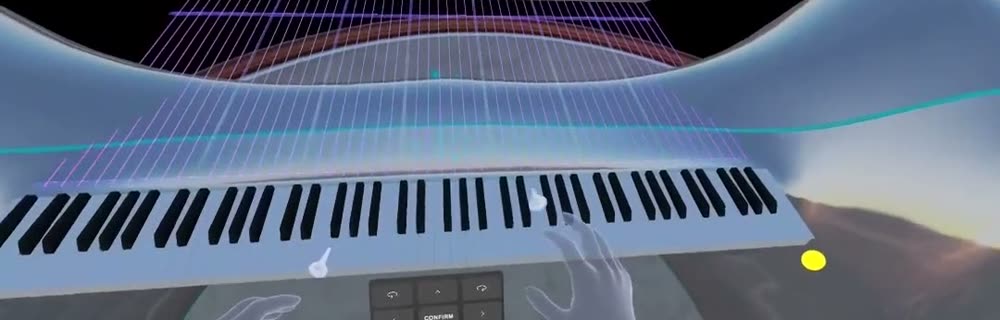
In a headset the lesson is not on a screen at all. The notes come down onto the keys you should press. The guide hands play in front of you, from your own point of view. There is nothing to look up at, so your eyes stay where your hands are, and your attention stays on the sound.
Video cannot show you your own hands
Every tutorial video is somebody else's hands, filmed from somebody else's angle. Your brain has to flip the image, guess the finger, and map it onto your own keyboard. That translation is slow, and it is where a lot of beginner mistakes come from.
Museverse shows a teacher's hands from your seat. Same angle, same keyboard, same fingers. Posture, depth and finger position - the three things a flat screen physically cannot teach - become things you can simply copy.
Feedback while you play, not a report afterwards
A phone app can tell you the note was wrong after the exercise. A headset can tell you while your finger is still on the key. Real-time feedback turns every wrong note into a tiny correction instead of a list at the end, and it turns every right note into the small hit of reward that games are built on.
That is also why we score. Not to rank you - to give you something to beat next time.
Practice that feels like play is practice that happens
The honest summary of what we have seen in early access is this: people practise for longer in the headset than they did on a flat screen, and they describe it as playing rather than practising. That is not magic. It is a loop that is short enough to retry, feedback fast enough to feel like a game, and a first real song early enough that there is a reason to come back tomorrow.
What this does not fix
A headset will not give you a teacher's ear. Museverse gives real-time feedback and scoring on the notes you play; it does not yet listen to how you played and decide what you should work on next. That adaptive part is something we are prototyping, and we will call it a feature only when it ships.
Frequently asked questions
Is learning music in VR better than a piano app on a phone?
For beginners, the biggest difference is attention. A phone app puts the instruction on a screen next to the instrument, so you keep looking away from your hands. In a headset the notes sit on the keys themselves and the guide hands play from your own point of view, so your eyes stay on the instrument.
Can I use Museverse in mixed reality, seeing my room?
For piano, yes. Museverse uses passthrough on the piano path, so you see your real keyboard, your real hands, and your room, with the lesson layered on top. Taiko and marimba are played on virtual instruments in front of you, with the controllers in your hands.
Do I need prior music knowledge?
No. Museverse is designed for complete beginners. Theory is introduced through playing, not before it.